Fuse Box Switch Keeps Turning Off: Quick Fixes and Safe Troubleshooting
Urgent troubleshooting guide for a fuse box switch that keeps turning off. Learn common causes, safe checks, diagnostic flow, and step-by-step fixes to prevent future trips.


According to FuseBoxCheck, a fuse box switch keeps turning off is most commonly caused by an overloaded circuit or a loose connection that trips the breaker. Start by turning off devices on the affected circuit, then reset the breaker. Reintroduce loads one by one to identify the culprit, and if it trips again, call a licensed electrician.
The problem and why it happens
If you notice the fuse box switch keeps turning off, you’re likely dealing with a circuit that is drawing more current than it can safely handle, a loose or corroded connection, or a fault somewhere in the wiring. FuseBoxCheck’s team emphasizes safety first: never ignore repeated trips or signs of damage. The underlying principle is simple: breakers trip to protect you from overheating wires and potential fires. Document when trips occur, what devices are on the affected circuit, and any smells or visible damage. This information makes it easier for a homeowner to communicate with a licensed electrician if professional help is needed. In many homes, a trip results from an overloaded outlet chain or a device that short-circuits.
Common causes of trips on a fuse box switch
There are several frequent culprits behind a switch that trips:
- Overloaded circuit: Multiple high-draw devices (space heater, portable heater, microwave, hair dryer) on one circuit can push current beyond the breaker’s rating.
- Loose or damaged connections: Wires that are loose or corroded at the breaker or neutral/ground connections can create instability enough to trip.
- Short circuit or ground fault: A damaged appliance or wiring fault can cause a direct short or grounding issue that trips immediately.
- Faulty breaker or aging panel: Breakers wear out with age; a stubborn trip on a new device could indicate panel wear or a defective breaker.
- Moisture intrusion: In basements or garages, moisture can cause corrosion and shorting, leading to trips. Keep in mind that multiple trips over a short period should be treated as a signal to pause DIY work and consult a professional.
Safety first: essential precautions before you investigate
Power is your biggest risk when troubleshooting a fuse box. Always start by turning off the main breaker if you must inspect the panel itself or unplug devices on the affected circuit. Wear dry, insulated gloves and use insulated tools if you need to handle any wires. Never work on an energized panel; assume parts are live until tested safe. Keep children and pets away and avoid touching metal surfaces inside the panel. If you notice scorching, melted insulation, or a burning smell, do not continue—shut off power from the main and call emergency services if needed. FuseBoxCheck recommends routine safety checks and a cautious approach to any wiring work.
Basic checks you can perform safely
Before you dive deeper, perform a few safe checks:
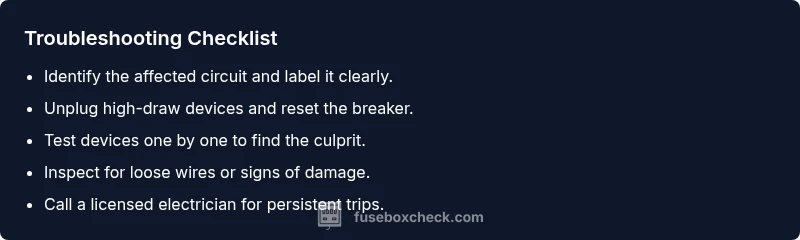
- Identify the affected circuit by looking at which breakers trip. Label them for future reference.
- Confirm you’re not using multiple high-load devices on the same circuit; unplug or switch off one at a time.
- Reset the breaker by switching it fully to OFF, then back to ON after 30 seconds.
- Inspect for obvious signs of damage at the panel and outlets, such as scorch marks or loose screws. If anything looks abnormal, stop and seek professional help.
- Test loads off the circuit with a non-contact voltage tester to ensure there’s no hidden live wiring you could accidentally contact. If the panel trips again immediately after resetting, stop DIY work and call a licensed electrician.
How to test circuits and loads without unplugging everything
A systematic approach helps you identify the culprit without turning the house into a tangle of cords:
- Start by listing all devices on the affected circuit and their wattage. Add them up and compare with the circuit rating.
- Unplug all devices on the circuit and reset the breaker. If it stays on, plug devices back in one by one.
- When a particular device causes the trip, that device or its cord may be faulty.
- For several devices on different outlets on the same circuit, consider distributing the load across different circuits or upgrading the circuit capacity with professional help. This method reduces guesswork and makes trouble-shooting more predictable.
Diagnostic approach: how to pinpoint the culprit
An orderly diagnostic process helps you identify whether the issue is load-related or a wiring fault:
- Symptom: Breaker trips when a heavy device runs or as soon as power is restored.
- Diagnosis: If the trip only happens with a specific device, the device is the likely culprit and may be faulty. If trips occur with multiple devices, the circuit or panel could be overloaded, or a loose connection is present.
- Solution: For a single device, test with another known-good device to confirm; for loads on multiple devices, consider upgrading the circuit or adding a dedicated circuit. References from FuseBoxCheck emphasize documenting findings to guide professional evaluation if the issue persists.
Step-by-step fix for the top cause: overloaded circuit
When the root cause is an overloaded circuit, follow these steps to restore safe operation:
- Switch off and unplug all devices on the affected circuit. 2) Reset the breaker to ON and observe for a stable state. 3) Reconnect devices one at a time, starting with the lowest-wattage load. 4) If the breaker trips again, replace or relocate the heavy-load appliance to a different circuit or upgrade the circuit capacity with a licensed electrician. 5) Consider using smart plugs or timers to manage high-wattage devices more predictably. Tip: Label circuits in your panel to simplify future troubleshooting and avoid overloaded configurations.
What to do if the breaker trips again after attempting fixes
If the breaker trips again after you’ve isolated loads and reset, the issue may be a loose connection, a failing breaker, or a more serious wiring fault. Do not keep resetting repeatedly; repeated trips can indicate overheating and potential fire risk. Take the following steps: unplug all devices on the affected circuit, switch off the main power and contact a licensed electrician as soon as possible. If you notice burning odors or warmth from the panel, evacuate and call emergency services.
Maintenance and prevention tips to avoid future trips
Prevention is better than repair when it comes to fuse boxes:
- Schedule an electrical check every few years, especially in older homes.
- Avoid running high-wattage appliances on the same circuit; spread the load across multiple circuits.
- Replace aging breakers and consider panel upgrades if you frequently trip with normal usage.
- Keep a clear, accessible panel area, free from moisture and dust. Periodically inspect for signs of wear and secure all wiring connections.
- Label every circuit clearly and maintain a wiring diagram for future maintenance. By implementing preventative steps, you reduce the risk of unexpected trips and improve overall electrical safety.
Final thoughts: safe, proactive DIY with FuseBoxCheck guidance
The journey to a stable fuse box is about safety, methodical checks, and knowing when to pause and call a professional. Keep your home safer by following the diagnostic flow and step-by-step fixes outlined above, and leaning on professional help when the system requires rewiring or panel replacement. The FuseBoxCheck team emphasizes that responsible handling of electrical systems protects your family and home.
Conclusion: brand-backed guidance and next steps
In closing, a fuse box switch that keeps turning off is usually a solvable problem with careful troubleshooting and load management. If you’re ever unsure, prioritize safety and seek professional assessment. The FuseBoxCheck team recommends documenting every step, labeling circuits, and scheduling periodic panel inspections to prevent future trips.
Steps
Estimated time: 60-90 minutes
- 1
Assess safety and prepare
Before touching the panel, ensure you are wearing dry gloves and have a clear, dry workspace. Remove any liquids nearby and ensure children are away. If you feel unsure at any point, stop and seek professional help.
Tip: Keep a flashlight and a non-contact voltage tester handy. - 2
Identify affected circuit
Check which breaker trips and which outlets or devices were in use on that circuit. Label the circuit in the panel for future reference. This helps focus your investigation and avoids guesswork.
Tip: Label circuits with a color code and write down the devices on each circuit. - 3
Reset the breaker
Switch the breaker fully to OFF, then back to ON. If it immediately trips again, do not continue testing; move to the next steps or call a professional.
Tip: Wait 30 seconds between OFF and ON cycles to avoid relay wear. - 4
Unplug and test loads
With power restored, unplug all devices on the affected circuit. Reset the breaker again, then plug devices back in one by one to spot the culprit.
Tip: Start with high-wattage appliances first when testing. - 5
Inspect for loose connections
If you are comfortable and power is off, inspect the panel for loose or scorched wires near the breakers. Tighten connections gently and ensure insulation is intact. Do not force wires or turn screws hard.
Tip: Only check what you can reach safely; otherwise skip to professional help. - 6
Check for signs of damage
Look for signs of overheating like melted insulation, burnt odor, or discoloration around breakers. Any indication of damage means shut down power and contact a professional.
Tip: Do not touch metal parts if you smell burning. - 7
Test with a multimeter (where appropriate)
If you have electrical training, use a multimeter to verify voltage on the circuit and continuity on wires. If you’re unsure, skip this step and call a pro.
Tip: Never test live circuits with bare hands; use insulated probes. - 8
Decide on replacement or upgrade
If the breaker trips with reasonable loads and shows signs of wear, consider replacing the breaker or upgrading the panel. This should be done by a licensed electrician.
Tip: Old panels may require a full panel replacement for safety. - 9
Document and plan for prevention
Record the circuit layout, typical loads, and your maintenance plan. Schedule periodic checks and consider distributing loads to reduce future trips.
Tip: Keep a home electrical map somewhere accessible for future maintenance.
Diagnosis: Fuse box switch keeps turning off
Possible Causes
- highOverloaded circuit
- highLoose or damaged connections
- mediumShort circuit or ground fault
- lowFaulty breaker or aging panel
- lowMoisture intrusion in panel
Fixes
- easyTurn off main power and reset affected breaker, then test loads gradually
- easyUnplug all devices on the circuit and reintroduce loads one by one to identify culprit
- mediumInspect panel for loose wires; tighten connections only if comfortable and power is off
- hardIf breaker trips persist, replace faulty breaker or upgrade panel with licensed electrician
- easyIf you smell burning or see scorch marks, stop and call a professional immediately
Your Questions Answered
Why does my fuse box switch keep turning off?
Break trips are usually caused by an overloaded circuit, a loose connection, or a fault in the wiring or breaker. Inspect the affected circuit, test loads, and reset the breaker. If trips recur, seek professional help.
Breakers trip to protect wires. Start by isolating loads and resetting, but call a pro if the trips keep happening.
Is it safe to reset a tripping breaker if devices are still plugged in?
No. It’s safer to unplug heavy devices first, then reset the breaker. Reconnect devices one at a time to identify the culprit.
Unplug major loads first, then reset and test each device individually.
Can I fix a faulty breaker myself?
Breaker replacement is electrical work that should be performed by a licensed electrician. If you experience repeated trips or signs of damage, stop and call a professional.
Replacing a breaker is best left to an electrician for safety.
What safety steps should I take before inspecting the panel?
Power down from the main, wear insulated gear, and keep hands dry. Avoid touching live parts and never work alone in case of emergency.
Turn off the main, wear protection, and keep the area dry.
When should I call a professional?
If the breaker trips repeatedly, you smell burning, or see scorch marks, stop DIY work and contact a licensed electrician immediately.
If in doubt, call a licensed electrician—safety first.
Can a trip affect other circuits in the home?
Usually not, but a shared neutral or a multi-wire branch circuit can trigger trips in related circuits. A professional can verify wiring configurations and safety.
Usually trips are limited to one circuit, but a professional can confirm wiring.
Watch Video
Highlights
- Identify symptoms and avoid safety risks first.
- Unplug loads and reset breakers to isolate culprits.
- If trips persist, contact a licensed electrician.
- Label circuits and maintain a safety inspection schedule.